Product Tour
Odyssey Framework Product Tour
Take a tour of Odyssey Framework from your first login through Business Profiles, Timeline Entries, AI Business Diagnoses, and every major feature.
Published August 6, 2026 • 4 min read
Odyssey Framework Product Tour
Watch the Overview
If you'd rather see the product in action first, watch this guided tour of Odyssey Framework.
This walkthrough follows the same path a new user takes after signing in, from creating an Odyssey to generating diagnoses and recording Timeline Entries.
Confirm Your Time Zone
The first time you log in, you'll be asked to confirm your time zone.
This ensures Timeline Entries and Business Diagnoses use the correct dates and times throughout the application.
Create Your First Odyssey
Every business in Odyssey Framework starts with an Odyssey.
After creating one, you'll be guided directly to the Business Profile.
Until your Business Profile is complete, the rest of the application remains locked to ensure every AI diagnosis begins with sufficient business context.
Complete Your Business Profile
The Business Profile contains approximately two questions for each of the seven stages:
- Offer
- Distribution
- Yardstick
- Sales
- Systems
- Execution
- Yield
Most businesses can complete it in just a few minutes.
Once finished, generate your first Business Diagnosis to establish your starting baseline.
Generate Your First Business Diagnosis
Your first diagnosis evaluates your business across all seven stages and provides:
- Overall Business Score
- Individual stage scores
- Your biggest bottleneck
- Why it's holding the business back
- The highest-leverage improvement
This becomes the baseline against which future diagnoses can be compared.
Record Timeline Entries
Businesses constantly change.
New marketing campaigns launch.
Employees are hired.
Processes improve.
Products change.
Sales increase or decline.
Record these important events as Timeline Entries so future AI diagnoses have more business context to work with.
Check New Entries
After saving Timeline Entries, select Check New Entries.
The review system evaluates each entry before it becomes part of your business history.
If an entry is unclear, it moves to Needs Review, where additional clarification may be requested.
After several unsuccessful clarification attempts, it moves to Needs Edit, where you can revise or delete the entry before it is included in future diagnoses.
Rerun Your Business Diagnosis
Whenever you've made meaningful changes to your business or recorded new Timeline Entries, rerun your Business Diagnosis.
Each new diagnosis incorporates your updated Business Profile and Timeline history, allowing your scores and recommendations to evolve alongside your business.
Dashboard
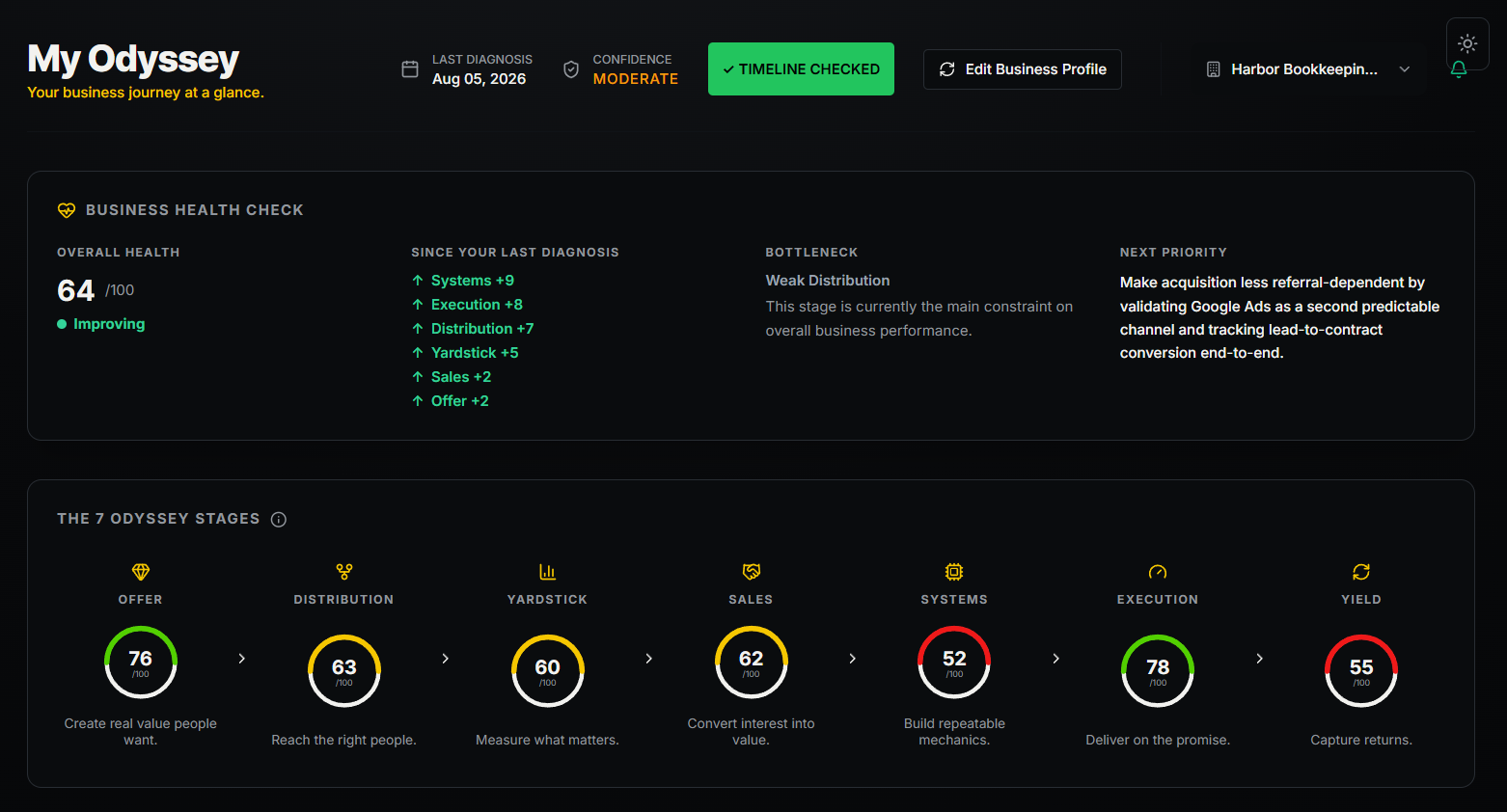
The Dashboard provides an overview of your business, including:
- Overall Business Score
- Seven stage scores
- Business health
- Recent activity
This is the primary page you'll return to after each diagnosis.
Reports
The Reports section stores previous Business Diagnoses.
You can review historical reports or export them whenever needed.
Company Analysis
Company Analysis evaluates publicly traded companies using the Odyssey Framework.
Each analysis highlights strengths, weaknesses, stage scores, and an overall company score.
Business AI
Business AI is tailored specifically to your business.
Instead of relying only on a prompt, it uses your Business Profile and Timeline Entries to answer questions with significantly more business context.
Public Odysseys
Businesses can choose to share an Odyssey publicly.
When enabled, visitors can explore shared Timeline Entries and observe how a business has evolved over time.
Sharing is completely optional and can be managed from the Settings page.
Tools, Learn, and Blog
Odyssey Framework also includes additional business tools, educational resources, and articles designed to help business owners make better decisions.
Settings
Your Business Profile, account settings, and sharing preferences can be updated at any time.
Any Business Profile changes will automatically be incorporated into your next Business Diagnosis after it is rerun.
Build a Better Business Record
The more meaningful Timeline Entries you record, the more business context Odyssey Framework has available for future diagnoses.
Rather than asking AI isolated business questions, you're building a structured record of how your business evolves over time—helping future analyses become increasingly relevant.
Ready to Explore Odyssey Framework?
Create your first Odyssey, complete your Business Profile, and begin building a structured history of your business.
Make Better Business Decisions.