Create an Odyssey
Create a record for the business you want to understand and improve.
Odyssey Learning Center
Master the seven stages, classify business activities correctly, and get more from every Business Diagnosis.
The Seven Stages
Click a stage below to open its guide.
Follow the shortest path from creating an Odyssey to maintaining a useful business record and receiving updated recommendations.
Create a record for the business you want to understand and improve.
Give Odyssey enough context to establish a meaningful baseline.
Review stage scores, the primary bottleneck, and recommended next actions.
Add meaningful developments, resolve entries that need attention, and rerun the diagnosis for an updated view.
The Odyssey Framework maps how a business creates value, moves it through the market, fulfills its promise, and captures enough return to continue.
Offer creates value. Distribution reaches the intended customer. Sales secures commitment. Execution fulfills the promise. Yield captures the return and helps fund the next Offer.
Yardstick and Systems strengthen the value path. Yardstick improves visibility and decisions. Systems makes important work more repeatable and less dependent on improvisation.
The stages are connected. Weakness earlier in the path can reduce the value of later effort, while a bottleneck can constrain the entire business even when other stages appear healthy.
Use this reference when you need to decide where a business activity belongs. This page is a lookup tool, not a replacement for the full stage guides.
Classify by the verb, never the noun.
Use this sequence when an activity appears to fit more than one stage.
Odyssey uses the Business Profile, usable checked timeline entries, and available integration data to evaluate the seven stages, identify the primary bottleneck, and generate recommendations.
Evidence Strength reflects how much usable business information Odyssey has available to analyze. It considers your Business Profile, eligible Timeline entries, and available integration data. More complete and relevant evidence generally gives Odyssey a stronger basis for its Business Diagnosis.
Complete your Business Profile so Odyssey has the baseline context it needs to understand your business.
Eligible Timeline entries add context about meaningful changes, decisions, results, wins, and setbacks over time. Unchecked entries and entries in Needs Edit are not used as diagnosis evidence.
Connect business systems such as Stripe, HubSpot, QuickBooks, or Shopify. A connection must contain usable synced data before it can contribute additional business context.
Evidence Strength combines usable context from your Business Profile, eligible Timeline entries, and available integration data.
Higher Evidence Strength means Odyssey has more usable business evidence to analyze, helping provide a stronger basis for Business Diagnoses.
Each score is a structured estimate of the stage's current strength based on the available business evidence.
Confidence describes how strongly the available evidence supports the diagnosis. More complete, specific, and consistent information usually provides a stronger basis for interpretation. A stage can have a high score without having high confidence.
The bottleneck is the stage most likely to constrain progress or reduce the return on additional effort elsewhere.
Recommendations focus attention on the actions most likely to strengthen the bottleneck or unlock the next stage of progress.
Scores can change after Business Profile edits or newly checked Timeline entries provide evidence of improvement, decline, or changed business conditions. New evidence does not automatically change a score if it mainly confirms the existing assessment. Positive or negative results elsewhere in the business also do not automatically mean every related stage should change.
Timeline evidence is evaluated according to the stage it represents. Results in one part of the business may provide useful context without directly changing the score of another stage.
New Timeline evidence may sometimes differ from information in your Business Profile or earlier Timeline entries. Odyssey considers the available context when producing a new diagnosis, which is why keeping your Business Profile current and recording meaningful changes in the Timeline is important.
Complete your business questionnaire to give Odyssey the baseline context it needs to produce more informed scores and relevant recommendations.
Answer every required question so Odyssey has the baseline context it needs to understand and evaluate your business.
Concrete answers about your business, customers, and processes give the diagnosis engine more to work with than general or vague responses.
If your business model, customers, or offer shift significantly, revisit your answers so your profile still reflects reality.
Business Profile context shapes how Timeline entries and Integrations data get interpreted, so an accurate profile improves the reliability of everything else.
Timeline entries create a living record of what changed in the business. Clear, business-related entries provide more useful evidence for future diagnoses.
Revenue went down.
Revenue declined 18% after Google Ads paused for two weeks because a billing card expired.
State what changed or what the business did.
Connect the event to the business outcome or operational consequence.
Select the stage that best represents the activity's primary function, or leave it unassigned for AI to classify.
Only entries that pass the AI check and are not in Needs Edit are included in the next Business Diagnosis.
Learn how an entry moves from a new update to usable evidence in the next Business Diagnosis.
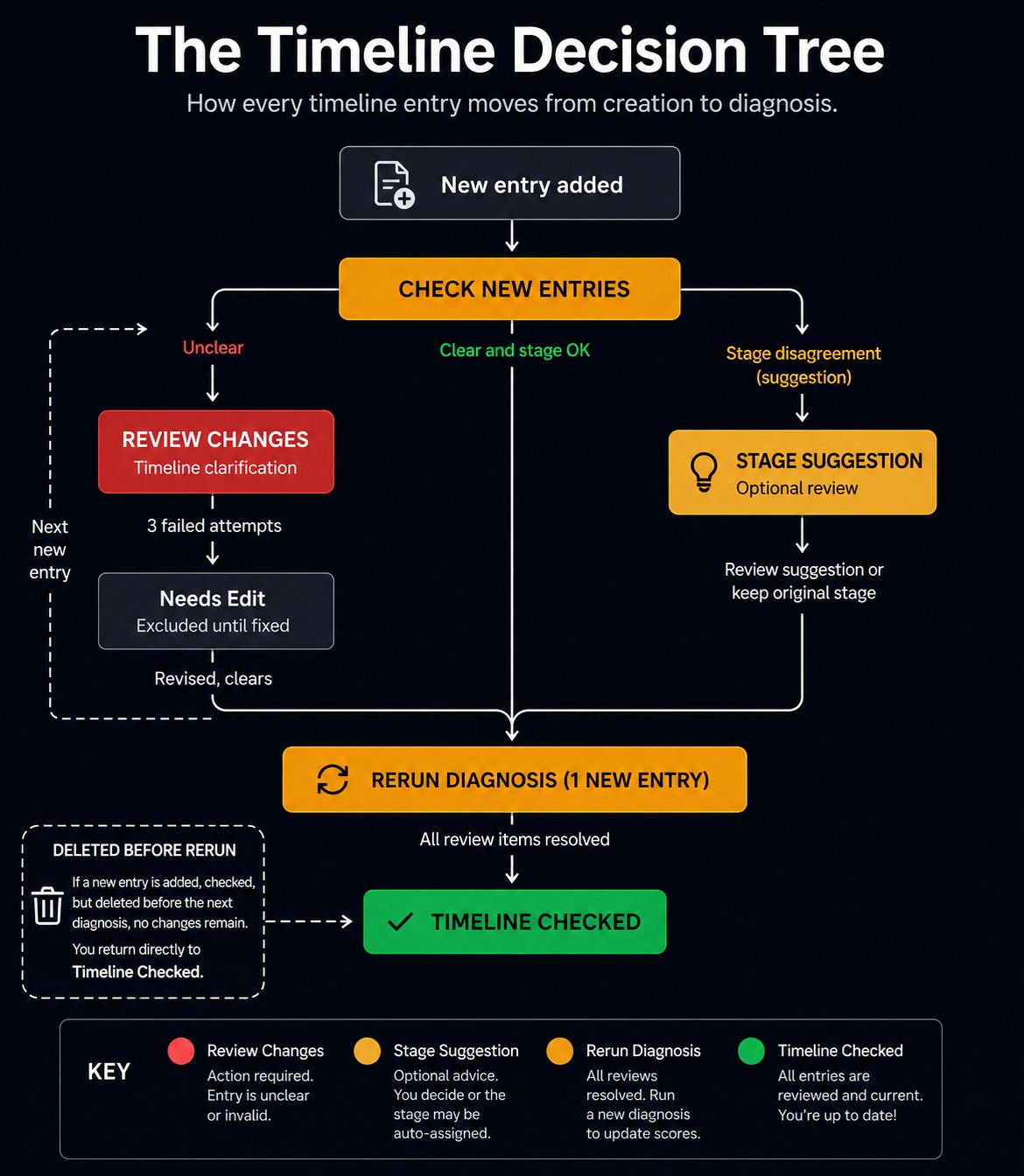
Every timeline entry follows a structured decision process before it affects the Business Diagnosis. Clear business-related entries and optional stage suggestions help AI follow the Odyssey Framework, resulting in more consistent and reliable recommendations. For the most meaningful insights, rerun the Business Diagnosis after accumulating several new timeline entries rather than after each individual update.
Delete the entry and create a clearer one. Timeline entries are meant to capture meaningful business events, not perfect writing. If an entry becomes difficult to resolve or is no longer relevant, simply create a new one instead.
Needs Review can contain either a Timeline Clarification or a Stage Suggestion. They are resolved differently.
This appears when an entry is unclear, nonsensical, or not sufficiently related to the business. You may revise it up to three times. If AI still cannot determine that it is clear enough to analyze after the third attempt, the entry moves to Needs Edit and remains excluded until it is cleared or deleted.
Entries move here after three unsuccessful clarification attempts. They remain excluded from future Business Diagnoses until successfully revised or deleted. Use Needs Edit to revise entries until they are clear enough for AI to analyze or delete them if they are no longer needed.
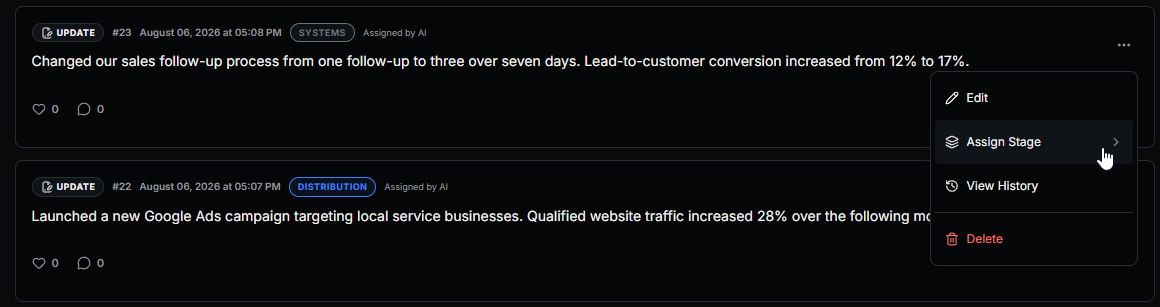
You can manually assign or change a stage right on the Timeline page, directly from the entry itself. Open the … menu on any entry and select Assign Stage:
Then choose the stage from the list. The currently assigned stage is highlighted:
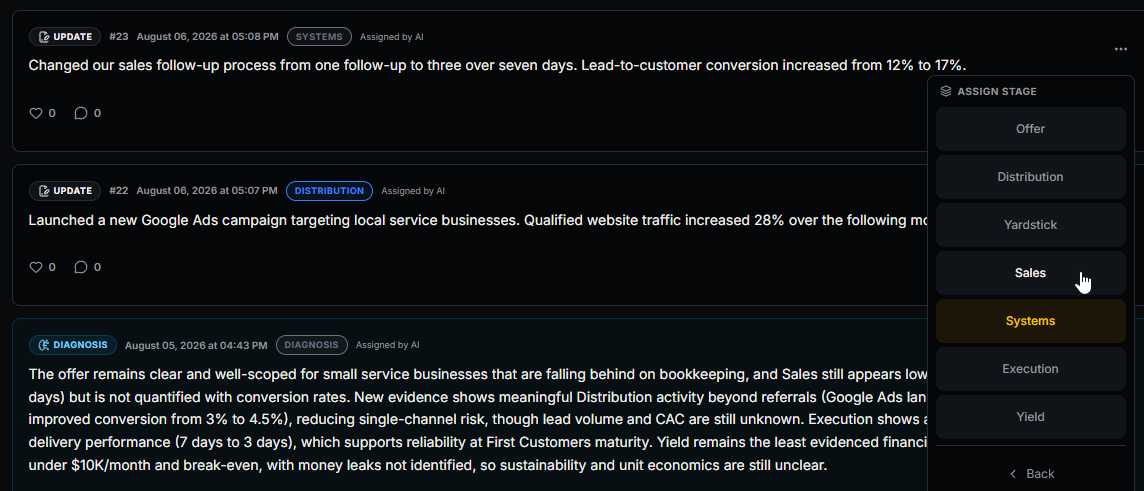
Changing a stage manually updates how that Timeline entry is classified, so your current Business Diagnosis becomes out of date. The Timeline button changes from Timeline Checked to Rerun Diagnosis, letting you know a fresh diagnosis is available.
AI helps organize business activity, but the business owner has final authority over stage assignments. Once the review is resolved, the retained stage becomes part of the evidence used in the next Business Diagnosis.
Once an entry's stage is resolved, that stage determines where the entry can directly affect diagnosis scoring, whether the stage was selected by you or assigned by AI.
The Timeline Status button changes automatically as your timeline progresses. Its color and label show the next step in the workflow.
You have one or more saved timeline entries that haven't been reviewed yet. Clicking this button checks only the new entries for eligibility, clarity, and stage suggestions. It does not run a new Business Diagnosis.
One or more entries require either clarification or a decision on an AI stage suggestion. Open Needs Review and resolve the pending items before rerunning your Business Diagnosis.
Your new entries have been checked, any review items have been resolved, and your timeline has changed since the last Business Diagnosis. Clicking this button updates your scores, recommendations, and analysis.
All timeline entries have been reviewed, no action is required, and your latest Business Diagnosis already reflects your current timeline.
You run a Business Diagnosis, then add three timeline entries. After selecting Check New Entries, one entry requires clarification. Once it is resolved, the button changes to Rerun Diagnosis. Rerunning analyzes all eligible new evidence and updates the diagnosis.
The Needs Review page summarizes your total review items, completed items, remaining items, and entries moved to Needs Edit. The progress bar shows how much of the current review queue you have resolved.
Record important changes as they happen and use Check New Entries whenever you've added new entries. After several new entries have accumulated and any review items have been resolved, click Rerun Diagnosis to update your scores, recommendations, and analysis.
Ask questions about your own business and receive tailored advice grounded in your Business Profile and Timeline entries.
Business AI uses the context you've provided about your company instead of treating every question like a generic business question.
Your Business Profile gives Business AI the baseline context it needs to understand what the business does, its maturity, customers, operations, and current situation.
Timeline entries give Business AI additional context about what has changed over time, including wins, setbacks, experiments, operational changes, and measurable results.
Use Business AI to explore priorities, bottlenecks, tradeoffs, next steps, or other questions where advice should reflect the actual context of your business.
Business AI is designed for tailored business advice. Better Business Profile and Timeline context gives it more information to work with when answering your questions.
Explore how a major business decision could affect your business over time through conditional projections based on your current business context and stated assumptions.
Describe a decision or change you are considering, then add the key assumptions Odyssey should use when evaluating it.
The Scenario Engine starts from your current Business Diagnosis and Business Profile. You can also choose whether to include eligible Timeline evidence for additional context.
Compare conditional projections at 6 months, 1 year, 2 years, and 5 years to see how the possible effects may change over time.
Each horizon can show a projected Business Score, projected stage scores, a possible primary bottleneck, assumptions, benefits, risks, and confidence.
Confidence reflects how strongly the available business context and assumptions support the projection. Longer-range projections generally carry greater uncertainty.
Scenario Engine results are conditional projections. They show what could happen if the scenario and assumptions unfold as described; they do not claim to predict what will actually happen.
Analyze a company through the seven Odyssey stages using publicly available business information.
Company Analysis evaluates a company across Offer, Distribution, Yardstick, Sales, Systems, Execution, and Yield to provide a structured seven-stage view.
Unlike a Business Diagnosis for your own Odyssey, Company Analysis is based on publicly available information rather than your Business Profile or private Timeline entries.
Running a Company Analysis does not change your own Odyssey, Business Score, stage scores, Business Profile, or Timeline.
Use the analysis to examine how the company appears across the framework and where its relative strengths, weaknesses, or bottlenecks may be.
Company Analysis is a structured assessment based on available public information. It is separate from the private evidence used to diagnose your own Odyssey.
Share selected parts of an Odyssey publicly while keeping control over which business information visitors can see.
Turn on Public Sharing when you want an Odyssey and its eligible public Timeline entries to be viewable through its public page.
Public Information settings let you control whether visitors can see the business website, latest Business Score, latest diagnosis date, and shared entry count.
You can separately choose whether public Timeline entries show likes and comments.
Your public Timeline has its own shareable page. Only eligible entries intended for public viewing appear there, while private business context remains separate.
Sharing settings also show public activity such as Timeline views, likes, and comments so you can see how visitors are engaging with the Odyssey.
Making an Odyssey public does not mean every piece of business information is automatically shared. Use the Public Sharing settings to choose what visitors can see.
Connect business systems so Odyssey can analyze available operational data alongside your Business Profile and timeline evidence.
Link accounts such as Stripe, HubSpot, QuickBooks, or Shopify from your dashboard's Connected Data Sources section.
Connecting an account isn't enough on its own — it needs to actually sync usable data, like transactions or contacts, before it counts toward your score.
If a connected integration is not contributing to Evidence Strength, confirm that it has successfully synced usable business data.
Successfully synced integrations can provide additional operational evidence for Odyssey to consider. A connection must contain usable synced data before it can contribute to your business context.
Answers to common questions about the framework, classification, diagnoses, timelines, and account usage.
Tools, departments, and nouns can serve many functions. The verb reveals what the activity actually does.
Yes, but it should have one primary stage based on the main value transformation.
They optimize and support the value path rather than forming a required value transformation.
Scores update when a new Business Diagnosis is run.
An entry is excluded when it has not been checked, is still awaiting clarification, is in Needs Edit, or has been deleted. It becomes eligible after it passes the AI check.
Some activities can reasonably fit more than one stage. AI recommends the stage it believes best represents the primary function, but you may keep your original selection.
Yes. Stage recommendations are advisory. Keeping your original stage does not prevent the entry from being used or block the next Business Diagnosis.
The entry moves to Needs Edit and is excluded from the next Business Diagnosis until it is clarified successfully or deleted.
A Timeline Clarification means the entry is not yet clear or business-related enough to analyze. A Stage Suggestion means the entry is usable, but AI recommends a different stage from the one you selected.